 OrderArc
WooCommerce orders page slow? Why it happens with many orders and how to fix it
If WooCommerce → Orders takes 5-10 seconds to open, or searching an order by email never finishes, the cause is almost always the size of the order tables, not your theme or hosting plan. The storefront can stay fast while the admin becomes unusable, because customer pages are cached and admin pages are not.
First, find out which of the three problems you have
Time these three screens with a stopwatch:
- WooCommerce → Orders, first page, no filters.
- Searching an order by customer email in that screen.
- Opening a single order.
The pattern tells you the cause:
| Slow | Fast | Likely cause |
|---|---|---|
| List and search | Single order | Legacy order storage (orders in wp_posts/wp_postmeta) |
| Search only | List, single order | Order volume: search joins every meta row and address |
| Everything in admin | Storefront | A plugin running heavy queries on every admin page (activity logs, reporting, multi-vendor) |
| Everything, storefront too | — | Server or database, not WooCommerce |
Cause 1: legacy order storage
Until WooCommerce 8.2, orders were posts, and every field (email, total, address) was a row in wp_postmeta. Listing 20 orders means joining thousands of meta rows. Switching to High-Performance Order Storage (HPOS) moves orders into dedicated tables with proper indexes.
Where: WooCommerce → Settings → Advanced → Features → Order data storage. If a plugin declares itself incompatible, WooCommerce blocks the switch and names the plugin; update or replace it first. Test on staging: a few old extensions read wp_posts directly and show stale data after the switch.
Measured on a test store with 100,000 orders and 20,000 refunds (legacy storage with sync): the order list went from 3.7 s to 1.2 s and search from 33 s to 1.8 s once the old orders were out of the live tables. HPOS alone fixes the list; it does not fix search at that volume (see cause 2).
Cause 2: order volume
HPOS makes the list fast at any size, but search still scans every order's meta, addresses and items. On the same test store with HPOS, the list loaded in 0.8 s and a search by email did not finish: the server cut it off at 40 s with a 500 error.
The fix is to keep only recent orders in the live tables. Two ways:
- Delete old orders. Fast, permanent, and it removes the history your accounting, refunds and repeat customers rely on. See archive vs delete for what you lose.
- Archive old orders. Move completed and cancelled orders older than N months into archive tables in the same database, where they can be searched, viewed and restored.
OrderArc does the second. On the test store, archiving 95,922 orders older than a year took 11 minutes in the background with the store still serving pages (order list 1.0-1.2 s during the run). After it, search dropped from "never finishes" to under a second. WooCommerce Analytics kept all 119,952 rows of history, because the stats tables are never touched.
Install it from WordPress.org: OrderArc – Order Archive for WooCommerce. It runs on your own database; nothing leaves the server.
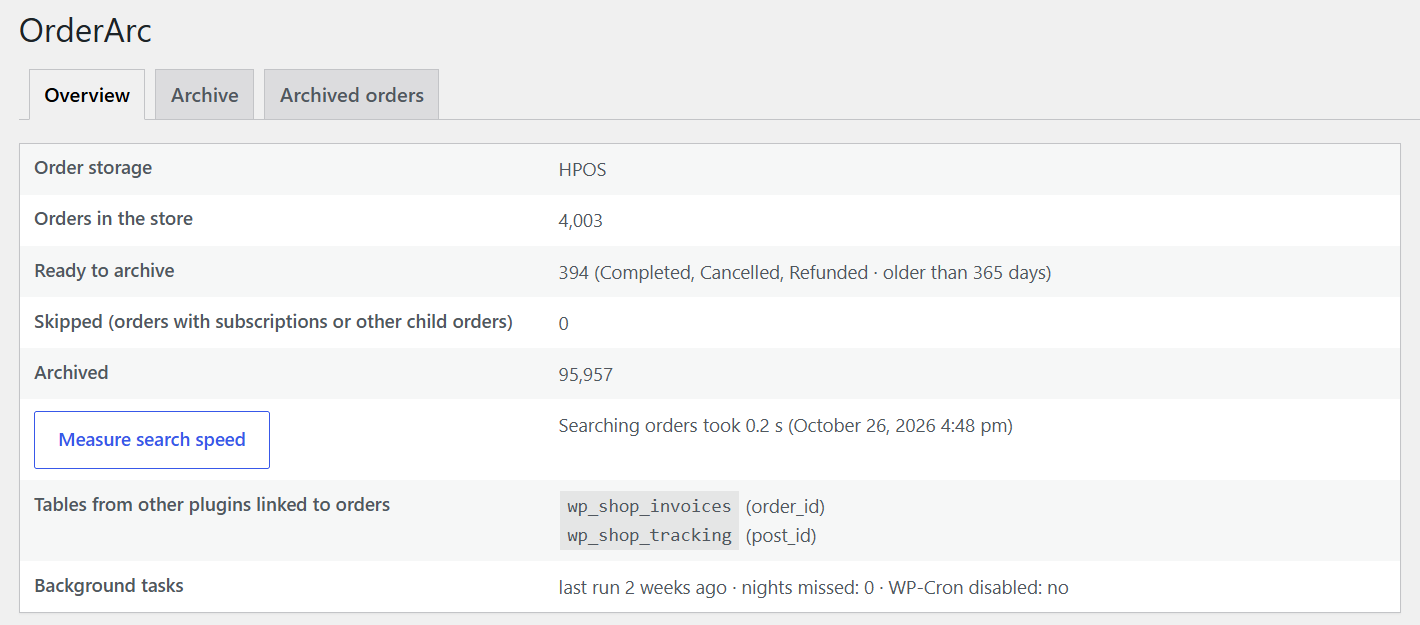
What it does not do: speed up the storefront, or shrink the database file (the archive lives in the same database).
Cause 3: a plugin, not the orders
If every admin screen is slow and the orders screen is just the worst, install Query Monitor, open the orders page and sort by query time. The usual suspects:
- Activity/audit logs recording every order change.
- Multilingual + multi-vendor combinations (a documented WPML + YITH Multi Vendor case adds hundreds of queries to the orders page).
- Reporting plugins that recompute totals on load.
- Action Scheduler backlog: WooCommerce → Status → Scheduled Actions with tens of thousands of pending or failed actions.
Deactivate the suspect on staging and time the screen again.
What will not help
- Caching plugins: the admin is never cached.
- A bigger server: it moves a 40-second search to 20 seconds.
- Deleting products or images: they are in different tables.
Sources
- WooCommerce: High-Performance Order Storage
- WPML errata: high query load on the orders page with multi-vendor plugins
- WordPress.org support: "very slow order page" (30K+ orders)
- Measurements: OrderArc test store, 100,000 orders, October 2026
More guides
- Should you delete old WooCommerce orders? Archive vs delete
- HPOS enabled but WooCommerce is still slow – what HPOS doesn't fix
- WooCommerce database too large: which tables grow and how to shrink them
- How to bulk delete old WooCommerce orders safely (and the reversible alternative)
- WooCommerce "auto archive old orders" feature request: three years later, what are your options