 OrderArc
Should you delete old WooCommerce orders? Archive vs delete
Delete only the orders that never became sales: failed, pending-payment and cancelled checkouts older than a few weeks. Keep every completed and refunded order for as long as your tax rules require, which is years, not months. If old completed orders are slowing the store, archive them instead of deleting them.
What deleting a completed order removes
- The tax record. Tax authorities require sales records to be kept for years (the exact period depends on the country, typically between four and ten). An auditor asks for the order, not for a spreadsheet you exported before deleting it.
- The customer's history. Repeat customers lose "My Account → Orders". Support loses the thread when someone asks about a purchase from two years ago.
- Refunds and disputes. A chargeback can arrive months after the sale; the card network expects the order details.
- Download permissions for digital products bought in that order.
- Analytics. WooCommerce Analytics reads its own lookup tables, so revenue charts survive a deletion until someone clicks "Regenerate analytics data", which rebuilds them from the orders that still exist. Then the deleted years disappear from reports.
What deleting does not fix
A smaller wp_posts or wc_orders table makes the admin faster, but the database file on disk does not shrink until the tables are optimized, and most of the size is in meta, items and notes, which go with the orders. Expect the admin to speed up and the backup size to drop; do not expect the storefront to change.
What is safe to delete
| Order status | Age | Delete? |
|---|---|---|
| Failed, pending payment, checkout draft | > 30 days | Yes. They are abandoned checkouts, not sales. |
| Cancelled, never paid | > 90 days | Yes, unless your accounting references cancellations. |
| On hold | any | No. Someone may still pay. |
| Completed, processing, refunded | any | No. These are your sales records. |
Before any bulk deletion: full database backup, then delete on staging first and check that reports, customer accounts and subscriptions still work.
Archiving: the middle ground
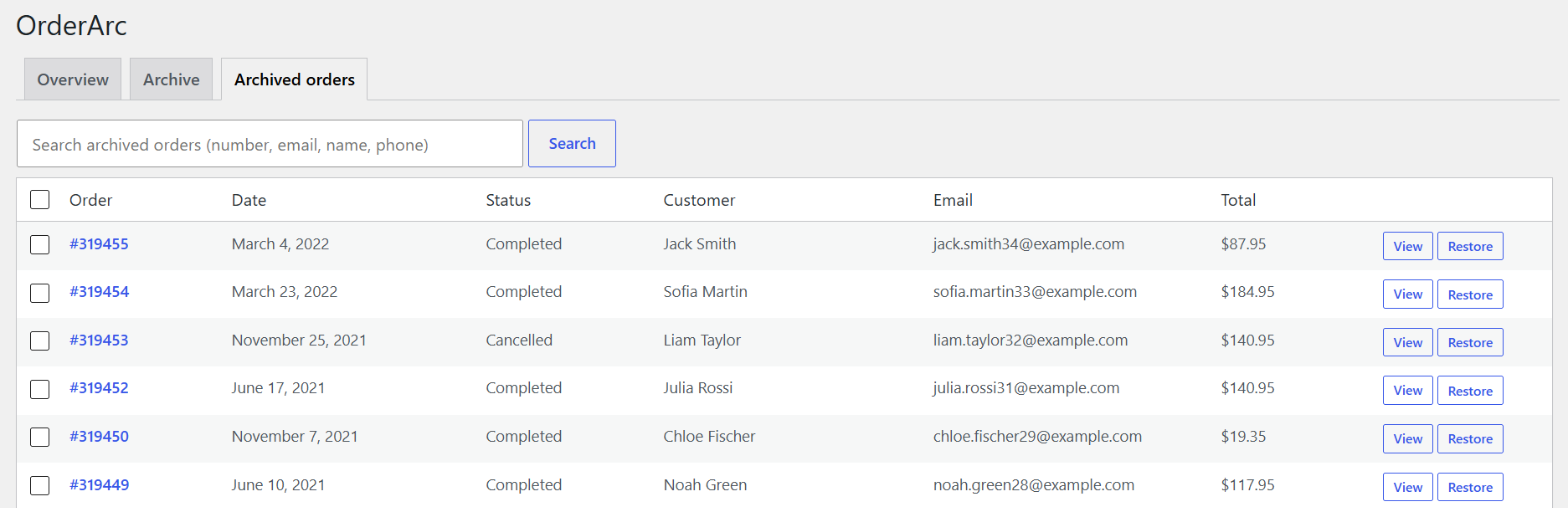
Archiving moves completed and cancelled orders older than a threshold out of the live tables into archive tables in the same database. The live screens see only recent orders and become fast; the archived orders remain searchable and can be restored one by one or all at once.
OrderArc does this. What it keeps intact, by design: WooCommerce Analytics (stats tables untouched), download permissions (customers keep downloading), the order number (reserved so a new order can never reuse it), and the customer's own view (archived orders appear as "Older orders" in My Account, read-only). Every batch is copied, verified by count and checksum, and only then removed from the live tables; a mismatch rolls the batch back.
Tested on a 100,000-order store: archive everything older than a year, restore all of it, compare 6 million rows: zero differences.
Install it from WordPress.org: OrderArc – Order Archive for WooCommerce.
A note on GDPR
"Delete old orders" and "erase personal data" are different obligations. GDPR asks you to erase personal data you no longer need; your tax law asks you to keep the sale. The usual answer is WooCommerce's own tool: Settings → Accounts & Privacy → Remove personal data from orders, which anonymises the customer fields and keeps the financial record. That works on live and archived orders alike.
Sources
- WooCommerce: privacy settings and personal data retention
- WooCommerce feature request: auto-archive old orders
- Measurements: OrderArc test store, October 2026
More guides
- WooCommerce orders page slow? Why it happens with many orders and how to fix it
- HPOS enabled but WooCommerce is still slow – what HPOS doesn't fix
- WooCommerce database too large: which tables grow and how to shrink them
- How to bulk delete old WooCommerce orders safely (and the reversible alternative)
- WooCommerce "auto archive old orders" feature request: three years later, what are your options